

Sending a cold DM on LinkedIn for a linkedin internship without a complete profile is like spawning into a dungeon with no gear. You are technically in the game, but every recruiter you encounter is going to walk right past you. The average recruiter spends under 10 seconds on a cold message, and most get deleted not because the candidate is unqualified, but because the message reads like a copy-paste quest item with zero personalization.
Recruiters flag empty LinkedIn profiles that just say "student" with no projects, skills, or role clarity. Your profile is your character sheet. If it is blank, no template in the world will save your cold DM from the trash folder.
By the end of this article, you will have a profile that passes the 7-second scan, two cold message templates you can send today, and a targeting system so you are never applicant number 51 again.
Level Up Your LinkedIn Profile Before Sending a Single Message
Your cold message only gets opened if the recruiter likes what they see when they click your name. Fix the profile first. Everything else is wasted effort.
What Is a LinkedIn Headline and Why It's Your First Impression Stat
The LinkedIn headline is the line of text that appears directly under your name. It is the first thing a recruiter reads after your name, and it is the stat that determines whether they open your profile or scroll past.
What is a headline on LinkedIn, practically speaking? It is 220 characters that should tell a recruiter exactly what you do, what you want, and why you are worth a click. A headline that says "Student at XYZ University" tells them nothing. A headline that says "Frontend Developer | React, TypeScript | Open to Internships" tells them everything.
Write your headline in this format: [Role You Want] | [Your Stack or Skill Set] | Open to Internships
That format works because it matches the keywords recruiters actually search for on LinkedIn, and it answers their first question before they have to ask it.
Profile Score: The Hidden XP Bar Recruiters Actually Notice
LinkedIn's profile strength meter is a real signal. A complete profile ranks higher in LinkedIn's internal search results, which means more recruiters find you without you having to message anyone.
To push your profile score higher, hit all five of these before you send a single cold message:
- Headline: Name the role you want, your stack, and your availability ("Open to Internships")
- About section: Two to three sentences on what you build, what you care about, and what kind of role you are targeting
- Experience or Projects: At least two entries, including personal projects, freelance work, or society roles if you have no formal experience
- Skills section: Add at least five skills that match your target internship description
- Profile photo: A clear headshot. Profiles with photos get significantly more views than those without.
A linkedin profile optimization tool like LinkedIn's built-in completeness checker will flag exactly which fields are dragging your score down. Use it.
Download Your Current CV from LinkedIn to Audit What You're Sending
Before messaging anyone, download your LinkedIn resume and read it like a recruiter seeing it for the first time. LinkedIn generates a PDF of your profile automatically.
To download cv from linkedin: go to your profile, click the "More" button below your profile photo, and select "Save to PDF." That is your linkedin resume export. Read it cold. Does it show a clear role target? Does it list relevant skills? Does it match the internship description you are applying for?
A strong example linkedin profile for a student shows a focused headline, a short sharp about section, and at least one project with a measurable outcome. A weak one says "student" and lists the university graduation year. Know which one yours is before you hit send on anything.
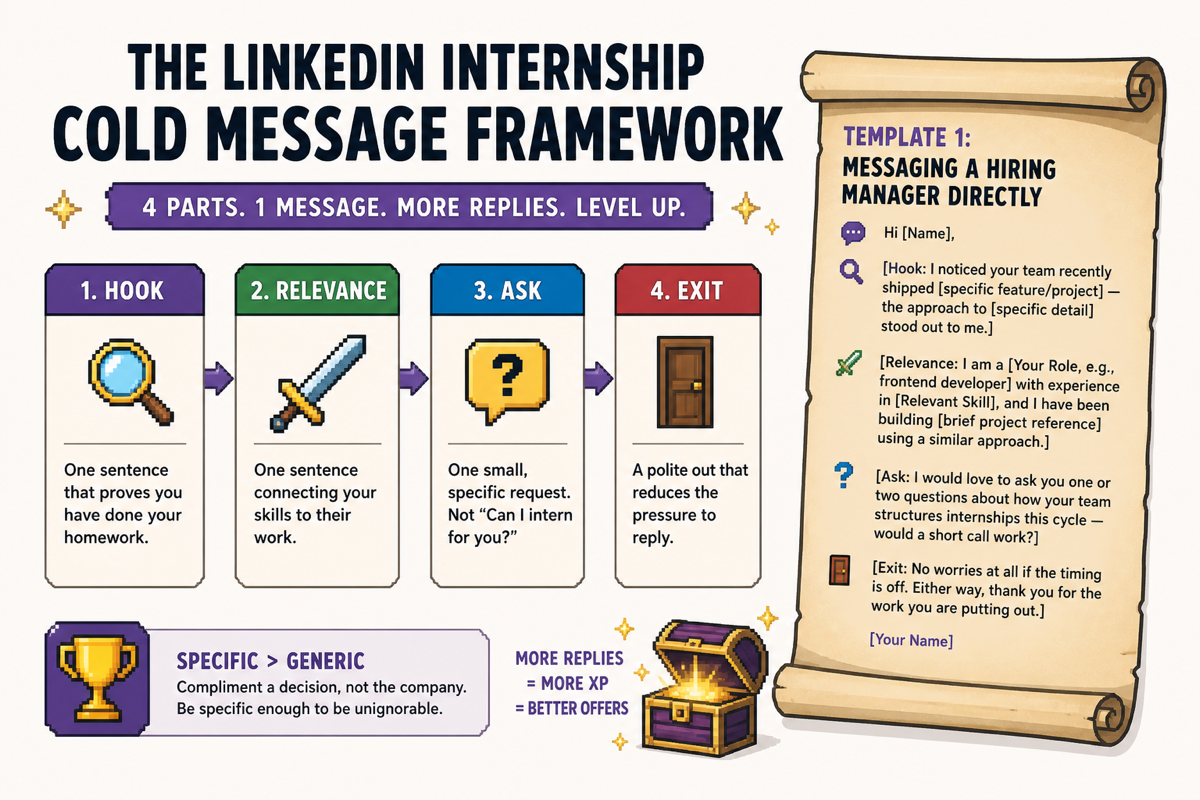
The LinkedIn Internship Cold Message Framework (With Templates)
What should you say when cold messaging on LinkedIn for an internship? Lead with one specific thing you know about their work, connect it to a relevant skill you have, and make a single small ask. Keep it under 150 words. Anything longer reads like a form letter.
The 4-Part Cold Message Formula: Hook, Relevance, Ask, Exit
Every cold message that gets a reply follows the same structure. Four parts, no fluff.
- Hook: One sentence that proves you have done your homework
- Relevance: One sentence connecting your skills to their work
- Ask: One small, specific request. Not "Can I intern for you?" but "Would you be open to a 15-minute call?"
- Exit: A polite out that reduces the pressure to reply
Template 1: Messaging a Hiring Manager Directly
Hi [Name],
[Hook: I noticed your team recently shipped [specific feature/project] — the approach to [specific detail] stood out to me.]
[Relevance: I am a [Your Role, e.g., frontend developer] with experience in [Relevant Skill], and I have been building [brief project reference] using a similar approach.]
[Ask: I would love to ask you one or two questions about how your team structures internships this cycle — would a short call work?]
[Exit: No worries at all if the timing is off. Either way, thank you for the work you are putting out.]
[Your Name]
This works because it is specific enough to be unignorable. Generic messages compliment the company. This one compliments a decision, which signals you actually looked.
Template 2: Messaging an Employee to Get a Warm Referral
Hi [Name],
[Hook: I came across your post about [topic they posted on] and it matched exactly what I have been working through in my own projects.]
[Relevance: I am finishing my [degree/bootcamp] in [field] and targeting internships in [their company's space]. Your path into [their company] looks like one I am working toward.]
[Ask: Would you be open to sharing what the internship application process looks like from the inside? Even a few lines would help me a lot.]
[Exit: I know this is a big ask from a stranger — I genuinely appreciate any time you can spare.]
[Your Name]
This version does not ask for a referral directly. It asks for information, which is a much easier yes. The referral often follows naturally once a conversation starts.
What Makes Recruiters Reply vs. Delete in Under 10 Seconds
Specificity is the single biggest factor. Use action words like "built," "shipped," "optimized," or "led" when describing your work. Relate your skills to something the company actually cares about. Generic praise ("I love what your company does") is the fastest path to the archive folder.
One other detail: keep your profile visible and complete before sending. If a recruiter clicks through and sees an empty linkedin job seeker profile, your message is already dead.
How to Find the Right People to Message for a LinkedIn Internship
Sending a great message to the wrong person is the same as not sending it. Targeting is the skill most people skip entirely.
Using LinkedIn Job Alerts to Spot Active Openings Before They Go Cold
Job alerts in LinkedIn let you get notified the moment a matching role goes live. That is your window to be first in line before the listing gets buried under 50 applications.
To set one up: go to the LinkedIn Jobs tab, run a search for your target role and location, then click "Set Alert" at the top of the results. LinkedIn will email you when new matches appear. Turn on alerts for every company you are targeting, not just every role title.
Once you see a new posting, cross-reference it against the company's People tab to find the hiring manager or a team member. That is your target.
Saved Jobs as a Hit List: How to Track and Prioritize Outreach
Saved jobs in LinkedIn work as a basic tracker. Save every role you are seriously considering, then use that list as your daily outreach hit list. Click the bookmark icon on any job listing to save it. Your saved jobs live under the "My Jobs" tab.
The limitation: managing more than 15 to 20 saved jobs manually becomes a real-time drain. You end up checking tabs, losing track of who you messaged, and missing follow-up windows. Researching a company's LinkedIn page, reading their posts, and checking the People tab before messaging dramatically increases reply rates. That prep takes time at scale.
Or skip the tab-juggling entirely. Elip is an AI job agent that runs 24/7 in your messaging app and delivers pre-screened internship matches directly to your chat, so you are always first in line instead of applicant number 51. No cost, no dashboard to babysit. Just relevant roles landing where you already spend time.
How to Post or Find Internship Listings as a Benchmark for Targeting
Knowing how to post job on linkedin or how to advertise a job on linkedin helps you reverse-engineer what hiring managers care about. Read internship listings from your target companies not just to apply, but to extract the exact skills and language they use. Mirror that language in your cold messages and profile.
After the Message: How to Signal You're Serious Without Being Annoying
Sending the message is level one. What you do after determines whether you actually get a response.
How to Change Open to Work on LinkedIn Without Alerting Your Current Boss
LinkedIn's Open to Work setting has two modes. The first is a public green frame on your profile photo, visible to everyone. The second is a private setting visible only to recruiters, not to your current employer's network.
To change open to work in linkedin: go to your profile, click "Open to" below your headline, select "Finding a new job," and choose who can see it. Select "Recruiters only" if you want to stay under the radar. This keeps your linkedin job seeker profile active in recruiter search results without broadcasting it to your entire network.
The One Follow-Up Rule That Gets Responses Without Being Desperate
Send one follow-up. One. Wait five to seven business days after your first message, then send a single short note: "Hi [Name], just circling back on my message from last week. Happy to answer any questions about my background. Thanks either way."
That is it. A second follow-up after no response reads as pressure. One follow-up reads as persistence. Two reads as desperation.
Promoted Posts and Visibility: When Sharing a 'Looking for Internship' Post Actually Helps
A looking for job post on linkedin can generate real inbound interest, but only if it has specifics. Use action words like "built," "shipped," or "spearheaded" to describe your skills. Connect your work to the kind of company you want to join. A vague post asking if "anyone knows of opportunities" gets ignored.
A linkedin promotion post or a public visibility post works best as a complement to cold messaging, not a replacement. When your network shares it, you get warm inbound from people who already trust the person who shared it. That is social proof cold messages cannot replicate.
Keep it organic. Paid promoted posts on linkedin are for companies advertising roles, not candidates. As a job seeker, your version of a promoted post is a well-written, specific update that your first-degree connections will actually want to share.
FAQ
What should I say when cold messaging on LinkedIn for an internship?
Lead with one specific observation about their work or company, connect it to a relevant skill you have built, and make one small ask like a 15-minute call or a single question. Keep the message under 150 words. Specificity is the only thing that separates a message that gets a reply from one that gets deleted.
How do I optimize my LinkedIn profile as a student or recent graduate looking for an internship?
Set your headline to name the role you want, your relevant skills, and that you are open to internships. Fill in your about section, add at least two experience or project entries, and list five or more skills that match your target roles. A complete linkedin profile for job seekers ranks higher in recruiter searches and makes your cold messages credible when they click through.
How do I download my CV or resume from LinkedIn to check what I'm sending?
Go to your LinkedIn profile, click the "More" button below your profile photo, and select "Save to PDF." That gives you a downloadable version of your linkedin resume. Read it as if you are a recruiter seeing it for the first time. Check that it names a clear role target, lists relevant skills, and matches the language in internship descriptions you are applying for.
Should I set my LinkedIn profile to 'Open to Work' before cold messaging?
Yes, but use the recruiter-only visibility setting so your current employer's network does not see it. Go to your profile, click "Open to," select "Finding a new job," and choose "Recruiters only." This keeps your profile active in recruiter search results and signals availability without broadcasting it to your entire network.
How do I find internship job alerts on LinkedIn so I can message before the role gets crowded?
Go to the LinkedIn Jobs tab, search for your target role and location, and click "Set Alert" at the top of the results page. LinkedIn will notify you when new matching roles go live. Use that window to find the hiring manager or a team member via the company's People tab and send your cold message before the listing accumulates a pile of applicants.
Your Next Move: Solo Grind or Bring Backup
You now have two paths. Option A is the manual route: optimized profile, targeted cold messages, saved job lists, daily alert checking, follow-up cadence. It works. It is also a part-time job on top of your actual life.
Option B is choosing your character class before the dungeon run. A solo rogue doing everything manually can clear the map. But a party member who handles loot detection 24/7 means you only show up for the boss fights: writing the perfect message and nailing the conversation.
Your profile is your gear. Your cold message is your weapon. The only question is whether you are going to farm solo or bring backup.
Try Elip free. It finds and screens internship roles in your niche and drops matches into your chat before the posting hits 50 applicants. No dashboard. No cost. Just first-mover advantage.
Related reading
- The Best Job Match Pro Alternatives for Tech Job Seekers [2026]
- Is Mercor Legit? 5 Alternatives for Tech Job Seekers Who Want Faster Results
- Shell Graduate Program 2026 India: Eligibility, Steps, and Deadlines
- 7 Best Job Agencies in Ernakulam for Tech Professionals (And One That Never Sleeps)
- 7 Best Outsourcing Jobs in AP for Tech Professionals in 2026