

You have 47 browser tabs open, three color-coded spreadsheets tracking applications, and Job Match Pro just surfaced a "perfect match" for a software developer role that closed six weeks ago. Ghost listings are the final boss of job searching, and right now you are fighting them with starter loot.
The real problem is compounding. Applying too late is one of the most common ways job seekers burn time with nothing to show for it. When a tool surfaces stale listings, it does not just waste an hour. It means you are entering every live role already behind 50 other candidates who moved faster. Job Match Pro is the force multiplier here, and right now it is multiplying the wrong thing.
This article ranks the best job match pro alternatives for tech roles in 2026, rated on three criteria that actually move the needle: speed, filtering quality, and autonomy. Pick your weapon and stop tab-hoarding.
What Job Match Pro Does Well (And Where It Leaves You Stuck)
Where Job Match Pro earns its reputation
Job Match Pro has a clean interface and pulls listings from a solid range of boards. For passive seekers browsing software jobs in Hyderabad for freshers or scanning for campus recruiting jobs, the matching logic is decent. It reads your profile, surfaces relevant roles, and does a reasonable job avoiding completely off-target results.
Think of it like a video game with stunning graphics. The core loop is functional. The job card software layer is intuitive. If you need a quick daily digest and have no urgency, it does the job.
The three gaps that hurt active tech job seekers most
First, listings go stale fast, and Job Match Pro does not filter ghost jobs aggressively. You waste clicks on roles that technically exist in a database but have already been filled or frozen.
Second, it is passive. Job Match Pro shows you opportunities the way a menu shows you food. It does not order for you. Without an autonomous apply layer like a speedy apply extension or a simplify copilot-style form filler, you are still clicking through dozens of applications yourself.
Third, it has no persistent memory. Every session starts cold. It cannot learn that you hate commutes over 20 minutes or that you only want senior roles with sponsorship. Tools like job analytics extensions track behavior over time. Job Match Pro does not. Not applying to enough roles at speed is a documented pattern that kills job searches. A passive matching tool compounds that problem rather than solving it.
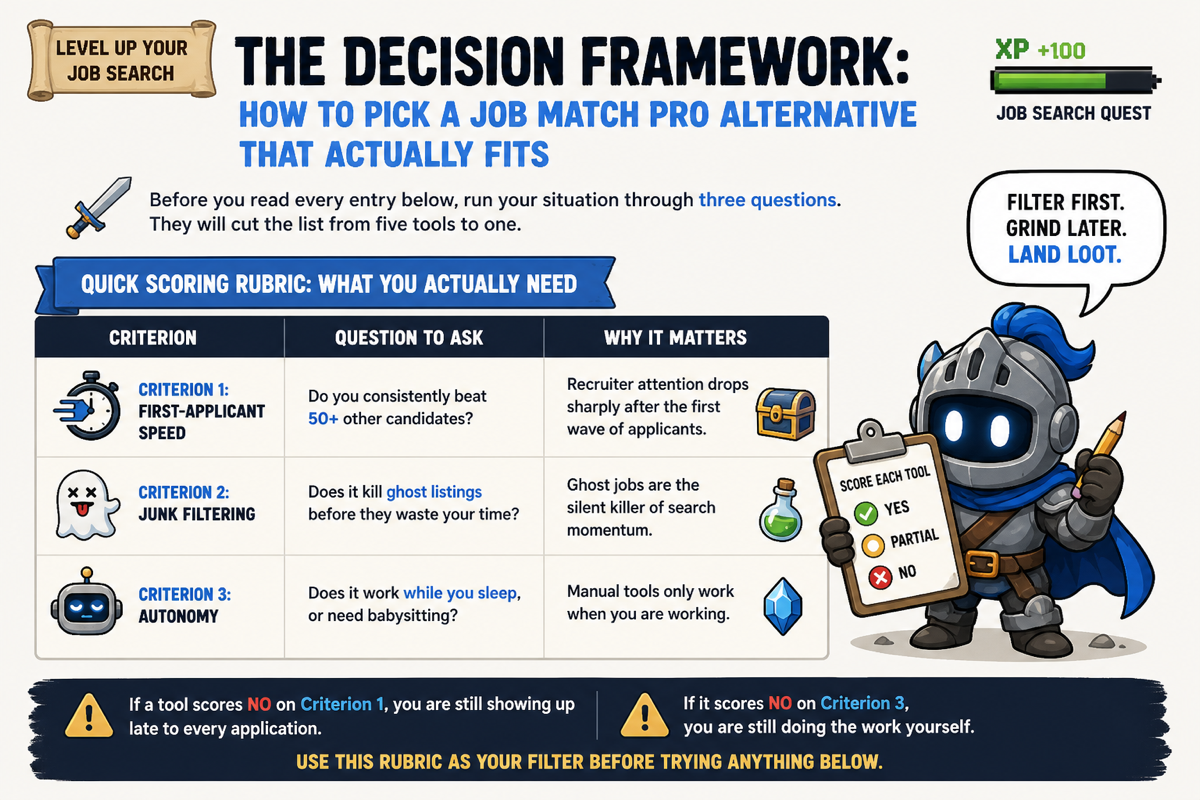
The Decision Framework: How to Pick a Job Match Pro Alternative That Actually Fits
Before you read every entry below, run your situation through three questions. They will cut the list from five tools to one.
Quick Scoring Rubric: What You Actually Need
- Criterion 1: First-applicant speed · Question to Ask: Do you consistently beat 50+ other candidates? · Why It Matters: Recruiter attention drops sharply after the first wave of applicants
- Criterion 2: Junk filtering · Question to Ask: Does it kill ghost listings before they waste your time? · Why It Matters: Ghost jobs are the silent killer of search momentum
- Criterion 3: Autonomy · Question to Ask: Does it work while you sleep, or need babysitting? · Why It Matters: Manual tools only work when you are working
Score each tool you consider as Yes, Partial, or No across these three criteria. If a tool scores No on Criterion 1, you are still showing up late to every application. If it scores No on Criterion 3, you are still doing the work yourself. Use this rubric as your filter before trying anything below.
The Best Job Match Pro Alternatives Ranked for Tech Job Seekers
1. Elip — Best for fully autonomous, 24/7 first-applicant status
Best for: Active tech job seekers targeting software developer jobs in the US, data engineer jobs in the USA, or any competitive role where being early is the entire game.
Beats Job Match Pro on: All three criteria. Criterion 1 especially.
Trade-off: Operates inside a messaging app rather than a dedicated dashboard. If you want charts and graphs, this is not your tool.
Recruiter attention concentrates on the first wave of applicants. Everyone after that is background noise. That is not an opinion. It is how the inbox works. Elip is built around that single truth.
Elip is the only AI job agent that lives inside your messaging app, Telegram or WhatsApp, and runs 24/7 with persistent memory of your preferences. It filters ghost listings before they reach you, then applies on your behalf the moment a real match drops, so you are always in the first wave of applicants. And it costs you nothing.
It covers 16 million postings daily, learns your preferences from feedback, and generates a tailored resume for each match. Whether you are chasing salesforce developer jobs in the USA or devops engineer jobs, you are not waking up to stale alerts. You are waking up to live matches that already have your name on them.
2. Simplify Copilot — Best for one-click form-fill across job boards
Best for: Developers who apply manually but want to stop retyping the same information into every ATS form.
Beats Job Match Pro on: Criterion 3 (partial). It reduces friction significantly even if it does not eliminate the human step.
Trade-off: You still have to find and select roles yourself. Simplify Copilot fills the form. It does not do the searching.
If you are targeting java developer jobs in the US or software engineering jobs in the USA across multiple boards, the form-fill speed matters. Simplify Copilot handles the repetitive data entry so you can push more volume in less time. It does not solve the ghost listing problem or achieve true autonomy, but it is a real upgrade for manual applicants who need throughput.
3. HiredAI — Best for match-mode control and recruiter trust signals
Best for: Job seekers who want to control how aggressively they match, from safe bets to growth stretches.
Beats Job Match Pro on: Criterion 2 (filtering quality) and match precision.
Trade-off: Requires more setup to configure match modes correctly. Not a set-and-forget tool out of the box.
HiredAI uses three match modes: roles where you are a strong fit, roles where you are roughly equivalent to other candidates, and roles where you are stretching into growth territory. That is a smarter filter than most alternatives. For fresher jobs for software engineers or software tester jobs for freshers, the growth match mode is genuinely useful because it surfaces roles slightly above your current level without sending you to jobs you are wildly underqualified for.
4. Speedy Apply — Best for volume-focused applicants on mainstream boards
Best for: Candidates who want to maximize application volume on the major job boards quickly.
Beats Job Match Pro on: Criterion 1 (speed) on mainstream boards.
Trade-off: Volume without quality filtering is just noise. Speedy Apply does not kill junk listings. You will still hit ghost jobs and irrelevant roles if you are not curating manually.
For roles like fresher job for software testing or campus recruiting jobs where the boards are standard and competition is high, Speedy Apply helps you move fast. Pair it with a quality filter from another source and it becomes more effective. On its own, it is a blunt instrument.
5. LinkedIn Easy Apply + job analytics extensions — Best free baseline for passive seekers
Best for: Passive job seekers who want zero cost and minimal setup.
Beats Job Match Pro on: Network visibility and recruiter discovery.
Trade-off: Easy Apply is noisy. You are competing with hundreds of applicants on every popular role. Without a job analytics extension tracking your application performance, you are flying blind.
For roles in data engineer job searches or exploring search engine evaluator jobs as a side path, LinkedIn's reach is hard to match. It is a legitimate starting point. But if you are actively trying to land a software job and competing for roles in a busy market, "passive seeker with Easy Apply" is the hard mode setting, not the optimized one.
Which Job Match Pro Alternative Should You Actually Use?
Stop overthinking it. Here is the verdict.
- If you are an active tech job seeker targeting software or data roles in a competitive market, use Elip because it applies first while you sleep.
- If you apply manually and just need to kill the form-filling grind, use Simplify Copilot because it removes the repetitive friction instantly.
- If you are a fresher or career switcher who wants smarter filtering without full automation, use HiredAI because the match modes stop you from wasting applications on roles you cannot win.
FAQ
Is Job Match Pro free to use, or are there hidden costs?
Job Match Pro has a free tier with limited matches per day. Premium features, including more daily matches and advanced filters, sit behind a paid plan. The free version works for casual browsing but becomes a ceiling if you are actively job searching at volume.
What is the difference between Job Match Pro and an AI job agent like Elip?
Job Match Pro surfaces matches and expects you to apply. An AI job agent like Elip applies autonomously on your behalf, 24/7, using persistent memory of your preferences. The difference is the gap between a menu and a personal chef. One shows you options. The other delivers the result.
Can these alternatives help with internship searches, like how to apply for a Google internship or an internship at Tesla?
Yes. Tools like Elip and HiredAI scan broad listing networks that include internship postings. For competitive programs like a Google internship or an internship at Tesla Motors, first-applicant speed matters even more than with standard roles because the application windows are short and volume is high. Autonomous tools give you a structural advantage.
Do any of these tools work for non-software roles like medical coding jobs in the USA or data engineer jobs?
Most of them do. Elip, HiredAI, and LinkedIn Easy Apply all index across job categories. Medical coding jobs in the United States, data engineer jobs in the USA, and even roles like sponsorship jobs or jobs with travel companies are all within reach depending on the tool's listing network. Match quality for non-tech roles varies, so check each platform's coverage before committing.
Is Mercor legit as a job matching platform compared to these alternatives?
Mercor is a real platform focused primarily on connecting engineers and technical talent with remote and contract roles. It is legitimate. Compared to the alternatives above, it is more specialized and recruiter-facing. If you are a developer open to contract work, it is worth checking. For broad job searches across multiple categories, the tools in this list offer more coverage.
How do I avoid ghost listings and junk postings when using job matching tools?
The fastest fix is choosing a tool that filters at the source rather than relying on you to spot dead listings manually. Tools that cross-reference posting dates, application activity, and employer signals will eliminate most ghost jobs before you see them. If your current tool is surfacing roles closed weeks ago, that is a filtering problem, not a you problem.
Conclusion
You can close this tab and keep running Job Match Pro on hard mode: ghost listings, late applications, and the slow realization that you are always application number 73 when recruiters stop reading at 50. Or you can swap your loadout.
You would not enter the final boss fight with starter loot. The job market in 2026 is not a casual playthrough. The three criteria from the framework above, speed, filtering, and autonomy, are the stats that actually win. Pick the tool that scores highest on the criteria your situation demands most, install it today, and stop letting stale listings eat your time.
Try Elip free. Add the AI job agent to your messaging app and get your first matched, live job alert today. No resume upload. No dashboard. Just matches delivered where you already live.